Price by surface
Set rates for driveways, siding, decks, patios, fences, and soft washing.
Start with a polished pressure washing estimate app for driveways, siding, decks, and patios. Set your own rates, calculate a price, and save customer-ready quotes.
Build this app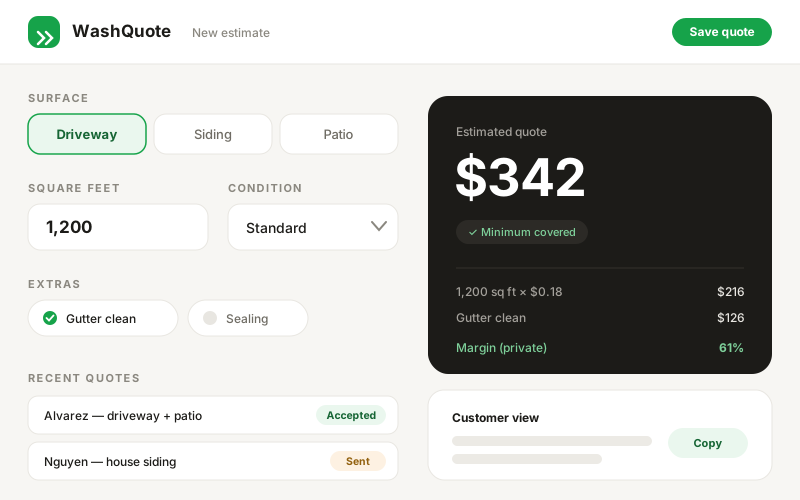
Set rates for driveways, siding, decks, patios, fences, and soft washing.
See labor cost, minimum fees, profit, and margin before the customer sees a price.
Keep internal numbers private and copy a customer-ready scope and total.
Review it before you build, then change the business name, services, rates, colors, or workflow.
Build a mobile-first pressure washing quote app called WashQuote for a solo operator or small crew.

The app must feel ready to use in the field, not like a generic dashboard.

Core flow:
- A "New quote" screen with customer name and address.
- Add one or more surfaces: driveway, house siding, patio, deck, fence, or roof soft wash.
- Each line has square footage, an editable per-square-foot rate, and a condition choice: light, standard, or heavy.
- Show the price updating immediately. Apply a configurable minimum job fee.
- Add optional travel, chemical, sealing, and gutter-cleaning charges.
- Show estimated labor cost, gross profit, and margin privately to the operator.
- Save quotes with Draft, Sent, Accepted, or Declined status.
- A customer-safe quote view hides internal cost and margin and can be copied as a shareable summary.

Use schema.ts and @omg-dev/sdk useCollection for persistent quotes and editable rate presets. Seed sensible sample rates but label them as examples. Use large tap targets, calm green and warm neutral colors, rounded cards, clear empty/loading states, and a sticky bottom action on mobile. Include three realistic sample quotes so the finished app looks useful immediately.Rates vary by market, access, material, crew speed, and chemical use. Seed the app with clearly labeled examples, then let the operator replace every assumption. The calculation should be transparent enough to explain in one sentence: area × rate × condition, subject to the minimum job fee.
Labor cost, chemicals, travel, gross profit, and target margin help the business make the decision. The customer needs the scope, optional services, total, and acceptance terms. Keeping those two views separate makes the wrong data impossible to share by accident.
Large controls, sensible defaults, instant totals, and a sticky save action matter more than dense reporting. Test the flow as if you are standing outdoors with one hand free: create a quote, adjust a surface, and copy the customer summary without hunting through menus.